phone: +420 776 223 443
e-mail: support@londoncreative.co.uk
Showing posts with label Utility. Show all posts

CCleaner Professional 3.22.1800 + Registered

CCleaner Professional 3.22.1800, Software ini Berguna Untuk menghapus file file sampah, Software ini sangat berguna bagi anda yang komputer atau laptopnya terasa berat.

CCleaner Professional 3.19.1721

CCleaner adalah sistem optimasi kami, privasi dan membersihkan alat. Ini akan menghapus file yang tidak terpakai dari sistem anda - memungkinkan Windows berjalan lebih cepat dan membebaskan ruang disk yang berharga keras. Hal ini juga membersihkan jejak aktivitas online Anda seperti sejarah Internet Anda. Selain itu mengandung registry cleaner fitur lengkap.

ScreenShot :
 

SEMOGA BERMANFAAT
^_^

Windows 8 Manager

Windows 8 Manager Features:
Information
Optimizer
Cleaner
Customization
Security
Network
Misc. Utilities


ScreenShot :


Why Should I use Windows 8 Manager?
Windows 8 is the newest Operating System for home users and professionals alike. Windows 8 brings clarity to your world, so you can more safely and easily accomplish everyday tasks and instantly find what you want on your PC.

Windows 8 Manager is the powerful software tool to tweak and optimize your Windows 8, it bundles more than 30 different utilities in one and help your system faster and more stable, secure and personal!
Features and Benefits of Windows 8 Manager
Information:
Get detailed system and all hardware information on your system; help you find out the installation key of Windows, Office products; show all detailed information of running processes and threads on your machine; Windows 8 Manager offers 1-clicking Cleaner cleans your system automatically; Repair Center helps you to fix various system problems.
Optimizer:
Tweak your system to improve windows startup and shutdown speed, tweak your hardware to increase system speed and performance; Control what is started on Windows startup, check and repair the advanced starup items to restore the malicious change by viruses; Tune up and optimize system services and Task Schedule, turn off smartly some unnecessary system services and tasks to improve system performance.
Cleaner:
Find out which files or folders engross your disk space and shown with chart; Smart Uninstaller can fully delete programs from your system without residual files and Registry entries; Find and clean junk files to increase Hard Disk space; Duplicate Files Finder can scan your computer for files with the same size, name and modification time; Registry Cleaner checks and repair incorrectly linked Registry entries; Registry Defrag rebuilds and re-indexes your Registry to reduce registry access time and therefore improve application responsiveness; Desktop Cleaner can clean useless icons and files on Desktop easily.
Customization:
Customize the look of your system by tweaking system Explorer, Desktop, Start Menu, Taskbar and notification area; Create the quick startup items on Taskbar with the Jump List launcher; Tune up Windows 7 boot menu; edit context menus of mouse Right-Clicking; Create the shortcut that executed quick on run dialog box. Visual Customizer can change system and file type icons, custom the logon background.
Security:
Improve system security by tweaking system components, UAC and login settings; Tune up System Restore options; Hide and restrict to access drives and programs; Encrypt/decrypt files, move system folders to safe locations; Undelete the files that accidentally deleted or formatted on disk; Privacy Protector can maintain your personal privacy by eliminating the tracks that you leave behind; Hide, add or delete the Control Panel entries.
Network:
Optimize your Internet connection speed, manage all shares items; Tweak your Internet Explorer easily; IP Switcher can switch your IP address easily on different networks; Edits the Hosts file to speed up surfing internet and permit only to access the specified Hosts.
Misc. Utilities:
Show the collection of Windows utilities; split and merge any files; Automatically back up files regularly using Super Copy. Registry Tools help you to operate Registry easily.

Windows Vista Manager

Vista Manager Features:
Information
Optimizer
Cleaner
Customization
Security
Network
Misc. Utilities


ScreenShot :


Why Should I use Vista Manager?
Windows Vista is the Operating System for home users and professionals alike. Windows Vista brings clarity to your world, so you can more safely and easily accomplish everyday tasks and instantly find what you want on your PC.

Vista Manager is the powerful software tool to tweak and optimize your Windows Vista, it bundles more than 30 different utilities in one and help your system faster and more stable, secure and personal!
Features and Benefits of Vista Manager
Information:
Get detailed system and all hardware information on your system; show all detailed information of running processes and threads on your machine; Vista Manager offers  1-clicking cleans your system automatically.
Optimizer:
Tweak your system to improve windows startup and shutdown speed; tweak your hardware to increase system speed and performance; Optimize Task Schedule to turn off unnecessary system tasks.
Cleaner:
Find out which files or folders engross your disk space and shown with chart; Find and clean junk files to increase Hard Disk space; Duplicate Files Finder can scan your computer for files with the same size, name and modification time; Registry Cleaner can easily checks your registry and repair incorrectly linked registry entries, automatically remove invalid entries; Registry Defrag rebuilds and re-indexs your registry to reduce application response time and registry access time.
Customization:
Control what is started on Windows startup;  tune up Vista boot menu; edit context menus of mouse Right-Clicking; customize system desktop, menus, toolbar and notifications settings; automatically change your desktop wallpaper on background.
Security:
You can improve desktop, menus, Windows logon securities, and enable numerous hidden performance options of system, disable system updates and error reports; hide and restrict to access drives, specify which applications are not allowed to be executed on your computer; encrypt/decrypt and shred files, change the location of system folders; Privacy Protector can maintain your personal privacy by eliminating the tracks that you leave behind; create lots of randomization password once.
Network:
Optimize your Internet connection speed, manage all shares items; tweak your Internet Explorer easily.
Misc. Utilities:
Show the collection of Windows utilities; help you find out the installation key of Windows, Office products; shutdown your PC or remind you automatically.

Windows Xp Manager

WinXP Manager Features:
Information
Optimizer
Cleaner
Customization
Security
Network
Misc. Utilities


ScreenShot :
Why Should I use WinXP Manager?
Windows XP  is the most advanced Windows Operating System for home users and professionals alike. But is your Windows XP' size Large? speed Slow? system Insecure? and Unfit to  your idea? Now it can be solved!
WinXP Manager is the powerful software tool to tweak and optimize Windows XP, it bundles more than 30 different utilities in one and help your system faster and more stable, secure and personal!
Features and Benefits of WinXP Manager
Information:
Get detailed system and all hardware information on your system; helps you to find out the missing Registration codes of Microsoft product; show all detailed information of running processes and threads on your machine; WinXP Manager offers  optimization Wizard feature for the user without having any advanced knowledge.
Optimizer:
Tweak your system to improve windows startup and shutdown speed; monitor and free your Physical Memory; tweak your hardware to increase system speed and performance; disable some unnecessary services which start with windows; repairs Internet Explorer and certain other System Components to restore these functions.
Cleaner:
Find out which files or folders engross your disk space and shown with chart; Find and clean junk, unnecessary wallpaper and screen saver files to increase Hard Disk space; Duplicate Files Finder can scan your computer for files with the same size, name and modification time; Registry Cleaner can easily checks your registry and repair incorrectly linked registry entries, automatically remove invalid entries; Registry Defrag rebuilds and re-indexs your registry to reduce application response time and registry access time; smart uninstaller can uninstall and logoff installed programs neatly.
Customization:
Control what is started on Windows startup; edit context menus of mouse Right-Clicking; customize system desktop, menus, toolbar and notifications settings, change Windows logon background; change system icons; custom OEM information; automatically change your desktop wallpaper on background.
Security:
You can improve desktop, menus, control panel, windows logon securities, and enable numerous hidden performance options of system, disable system updates and error reports; hide and restrict to access drives, specify which applications are not allowed to be executed on your computer; encrypt/decrypt and shred files, camouflage folder to hide its content from Windows explorer, change the location of system folders; Privacy Protector can maintain your personal privacy by eliminating the tracks that you leave behind; create lots of randomization password once.
Network:
Optimize your Internet connection speed, manage all shares items, search for and find out opened ports on your system; Tweak your Internet Explorer easily; backup all data in Outlook Express; automatically check the invalid URLs in your favorites and parse domain name; Message Sender can easily send messages to others.
Misc. Utilities:
Show the collection of Windows utilities; control your computer when you're not at home; apply XP visual style to any Windows applications; appoint logging on time of any account users. 


Windows 7 Manager 4.0.6 Full Keygen

Windows 7 Manager 4.0.6 adalah sebuah software utilities yang berfungsi untuk meningkatkan performa dan mengoptimalkan kinerja windows 7.

ScreenShot :

Features Information (From Official website)

Why Should I use Windows 7 Manager?
Windows 7 is the newest Operating System for home users and professionals alike. Windows 7 brings clarity to your world, so you can more safely and easily accomplish everyday tasks and instantly find what you want on your PC.

Windows 7 Manager is the powerful software tool to tweak and optimize your Windows 7, it bundles more than 30 different utilities in one and help your system faster and more stable, secure and personal!
Features and Benefits of Windows 7 Manager
Information:
Get detailed system and all hardware information on your system; help you find out the installation key of Windows, Office products; show all detailed information of running processes and threads on your machine; Windows 7 Manager offers 1-clicking Cleaner cleans your system automatically; Repair Center helps you to fix various system problems.
Optimizer:
Tweak your system to improve windows startup and shutdown speed, tweak your hardware to increase system speed and performance; Control what is started on Windows startup, check and repair the advanced starup items to restore the malicious change by viruses; Tune up and optimize system services and Task Schedule, turn off smartly some unnecessary system services and tasks to improve system performance.
Cleaner:
Find out which files or folders engross your disk space and shown with chart; Smart Uninstaller can fully delete programs from your system without residual files and Registry entries; Find and clean junk files to increase Hard Disk space; Duplicate Files Finder can scan your computer for files with the same size, name and modification time; Registry Cleaner checks and repair incorrectly linked Registry entries; Registry Defrag rebuilds and re-indexes your Registry to reduce registry access time and therefore improve application responsiveness; Desktop Cleaner can clean useless icons and files on Desktop easily.
Customization:
Customize the look of your system by tweaking system Explorer, Desktop, Start Menu, Taskbar and notification area; Create the quick startup items on Taskbar with the Jump List launcher; Tune up Windows 7 boot menu; edit context menus of mouse Right-Clicking; Create the shortcut that executed quick on run dialog box. Visual Customizer can change system and file type icons, custom the logon background.
Security:
Improve system security by tweaking system components, UAC and login settings; Tune up System Restore options; Hide and restrict to access drives and programs; Encrypt/decrypt files, move system folders to safe locations; Undelete the files that accidentally deleted or formatted on disk; Privacy Protector can maintain your personal privacy by eliminating the tracks that you leave behind; Hide, add or delete the Control Panel entries.
Network:
Optimize your Internet connection speed, manage all shares items; Tweak your Internet Explorer easily; IP Switcher can switch your IP address easily on different networks; Edits the Hosts file to speed up surfing internet and permit only to access the specified Hosts.
Misc. Utilities:
Show the collection of Windows utilities; split and merge any files; Automatically back up files regularly using Super Copy. Registry Tools help you to operate Registry easily.

Daemon Tools Pro Advanced 5.1 - Full Crack


Daemon Tools Pro Advanced 5.1 - Full Crack merupakan software yang dapat anda gunakan untuk membuat Virtual Drive, Burn Image Disc (.iso,.nrg, dan sebagainya) dan mengedit Image CD/DVD.
Biasanya Daemon Tools Pro Advanced 5.1 - Full Crack ini di gunakan untuk penginstalan game tertentu yang membutuhkan virtual drive.

ScreenShot :


SEMOGA BERMANFAAT
^_^

KeyScrambler Premium 2.9.1 Full Keygen


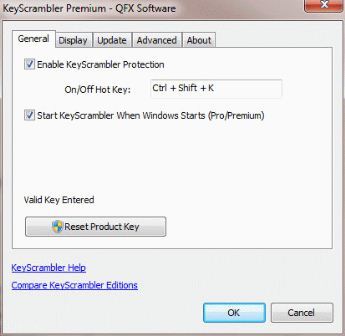
Sekarang jamannya keylogger, banyak warnet-warnet nakal yang secara tidak sengaja ataupun di sengaja yang memasang keylogger di komputernya. Risih ngk sob ? Saya tau, pasti Anda risih dan ngk tenang kan ? soalnya kita tidak tahu warnet mana atau komputer mana yang di pasangi keylogger. Sekarang sobat blogger nggak perlu khawatir lagi, karena saya ada penangkal Keylogger dengan bantuan software KeyScrambler Premium 2.9.1 Full.

Keyscrambler merupakan software yang berfungsi untuk menangkal keylogger. Dengan menggunakan Keyscrambler ini, sobat blogger akan merasa lebih aman bila berkunjung atau menggunakan warnet.
 

SEMOGA BERMANFAAT
^_^

Speeder XP

Software ini adalah salah satu software yang dapat digunakan untuk meningkatkan kinerja dari komputerk. Kinerja tersebut antara lain meningkatkan kecepatan komputer, meningkatkan akes internet dan dapat membuat komputer memainkan game yang berat ( grafis tinggi ). dengan software ini kamu dapat membuat komputer tua kamu menjadi lebih stabil dalam memainkan games.
Software Ini juga bisa di gunakan untuk upload File sehigga proses upload bisa lebih cepat.

Download | Speeder XP | 566.07 KB

SEMOGA BERMANFAAT
^_^

Advanced RAR Repair 1.2 Full Version


Advanced RAR Repair 1.2 Full Version adalah sebuah software yang bisa di gunakan untuk merepair file RAR, misalnya file tersebut corrupt atau sebagainya. jika ada file RAR tetapi saat di buka error jangan dulu di hapus, coba memakai software ini yang bisa memperbaiki RAR yg rusak atau corrupt.

ScreenShot :

Download |Advanced RAR Repair 1.2 Full Version|

SEMOGA BERMANFAAT
^_^

Ashampoo WinOptimizer 9.1.1 - Full Version


Ashampoo WinOptimizer 9 adalah salah satu software uti;ities yang memiliki fitur yang tidak kalah dengan utilities populer lainnya seperti TuneUp Utilities, Advanced SystemCare... dsb. Ashampoo WinOptimizer 9 ini jika di gunakan ringan di bandingkan TuneUp Utilities, Namun kualitasnya tidak sembarangan.

ScreenShot : My PC
Download |Ashampoo WinOptimizer 9 - Full Version | (24Mb)

SEMOGA BERMANFAAT
^_^

CCleaner Business Edition 3.14.1616


CCleaner Business Edition 3.14.1616 memang berukuran kecil, namun software andalan saya untuk menghapus sampah registry yg tidak terpakai di system kita.

ScreenShot : (My Pc)

Download : CCleaner Business Edition 3.14.1616 |3.54Mb

SEMOGA BERMANFAAT
^_^

PC tools Performance Toolkit 2.0.0 (Offline Installer) + Crack


PC Tools Performance Toolkit 2.0 - Full Crack (Offline Installer), mungkin sudah ada yang pernah mendengar software ini. PC Tools Performance Toolkit 2.0 - Full Crack ini merupakan salah satu utilities yang tentunya dapat kita gunakan untuk kepentingan maintenance.

ScreenShot (My PC) :


Download

SEMOGA BERMANFAAT
^_^